What is RSI?#
Regular and substantive interaction, commonly referred to as RSI, describes the meaningful and ongoing instructional engagement that must occur between an instructor and students in a distance education course.
At Chandler-Gilbert Community College, online courses must include planned, instructor-initiated interaction that supports student learning throughout the course. RSI is more than posting course materials, assigning automatically graded activities, or responding only when students ask for help. It requires instructors to create predictable opportunities for instructional interaction and to actively monitor and support student progress.
This page will help you:
- understand the difference between regular and substantive interaction;
- identify Canvas activities that can demonstrate RSI;
- recognize activities that do not meet RSI expectations;
- plan appropriate instructor interaction throughout your course; and
- understand how RSI practices may be reviewed through the college assurance process.
Why RSI Matters#
CGCC online courses are classified as distance education courses. Federal regulations distinguish distance education from correspondence education based largely on whether the course includes regular and substantive interaction between students and the instructor.
Federal Definition and Regulatory Background#
Effective July 1, 2021, the U.S. Department of Education revised the federal definitions related to distance education and clarified what constitutes regular and substantive interaction, commonly referred to as RSI.
Distance education may be evaluated for different regulatory, accreditation, and institutional purposes. However, regular and substantive interaction provides the essential foundation for distinguishing distance education from correspondence education.
CGCC’s online courses are offered as distance education. To maintain that classification, online courses must provide regular and substantive interaction between students and qualified instructors. Courses in which instructor–student interaction is limited, is not regular and substantive, and is primarily initiated by students could be classified as correspondence courses. Correspondence education is not an accredited instructional format at CGCC and may affect institutional and student eligibility for federal financial aid.
Federal Definition of Distance Education#
Under 34 CFR § 600.2 (links to federal registrar), distance education is education that uses approved technologies to:
- deliver instruction to students who are separated from the instructor or instructors; and
- support regular and substantive interaction between students and instructors, either synchronously or asynchronously.
Technologies that may be used to provide distance education include:
- the internet;
- one-way or two-way transmissions through broadcast, cable, broadband, fiber optics, satellite, wireless communication, or similar technologies;
- audio conferencing; and
- other media used in conjunction with one or more of these technologies.
At CGCC, online distance education is delivered primarily through the internet, including the Canvas learning management system and other institutionally supported technologies.
The federal definition also specifies that an instructor is an individual who is responsible for delivering course content and who meets the instructional qualifications established by the institution’s accrediting agency.
RSI Dashboard Visual of Recommended Practices#
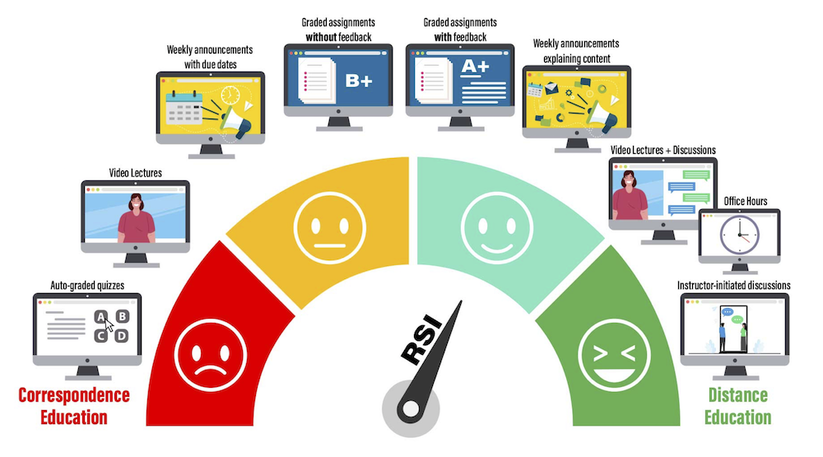
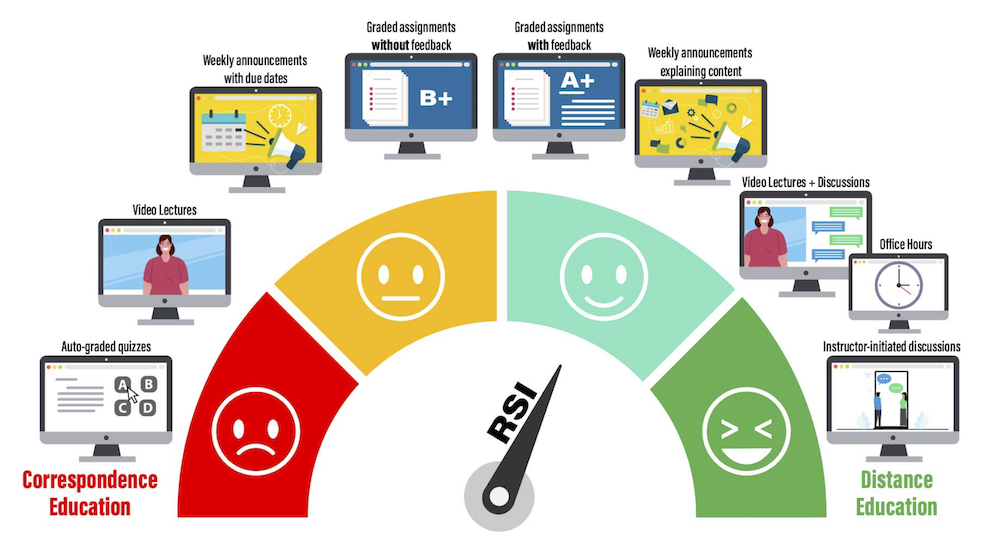
Graphic from OSCQR-SUNY Online, “Regular & Substantive Interaction“. The needle points towards a happy face where multiple forms of substantive interaction are occurring to ensure the qualification of “Distance Education over Correspondence Education.
Substantive Interaction#
Substantive interaction engages students in teaching, learning, and assessment activities that are consistent with the course content. A distance education course must include at least two of the following forms of interaction:
- Providing direct instruction.
- Assessing or providing feedback on a student’s coursework.
- Providing information or responding to questions about course or competency content.
- Facilitating a group discussion about course or competency content.
- Providing other instructional activities approved by the institution’s or program’s accrediting agency.
Regular Interaction#
An institution ensures regular interaction by:
- providing opportunities for substantive interaction on a predictable and scheduled basis that is appropriate for the course length and amount of content; and
- monitoring students’ academic engagement and success and ensuring that an instructor promptly and proactively initiates substantive interaction when students need support or request assistance.
Regular interaction therefore requires more than making an instructor available when students have questions. Instructors must intentionally plan opportunities for interaction, monitor student progress, and initiate appropriate instructional contact throughout the course.
Academic Engagement#
Federal regulations define academic engagement as a student’s active participation in an instructional activity related to the student’s course of study. Examples include:
- attending a synchronous class or instructional activity that provides an opportunity for interaction;
- submitting an academic assignment;
- taking an assessment or examination;
- participating in an interactive tutorial, webinar, or computer-assisted instructional activity;
- participating in an assigned study group, group project, or online discussion; or
- interacting with an instructor about academic matters.
Simply logging into an online course without participating in an instructional activity does not demonstrate academic engagement.
Academic engagement and RSI are related but distinct.
Academic engagement describes what the student actively does, while RSI describes the institution’s and instructor’s responsibility to provide ongoing, meaningful instructional interaction.
What Does RSI Look Like in Canvas?
**The following information was compiled by members of the CGCC Online Learning Advisory Council.**
NOTE: RSI indicators should be completed in Canvas as it is the institution’s official online learning management system. RSI conducted in other 3rd party platforms that would not be accessible by a regulatory official during a review would not meet the requirements.
Assessing or Providing Feedback on a Student’s Coursework#
Examples of this in Canvas:
- Provide and use grading rubrics for all assignments in conjunction with qualitative individual feedback.
- Give detailed criterion and ratings explanations
- OR use freeform comments
- Grading rubrics tell students what to expect, and qualitative feedback elaborates on how well they met that expectation in a personalized way
- Grade assignments in a timely manner AND provide feedback in one or all of the following:
- Comments box in Speedgrader
- Efficiently personalize them using the Comment Library and adding the student’s name
- Give qualitative feedback on how they can improve on the next assignment
- Remark on something you liked or that they did particularly well. Positive feedback is just as important as negative feedback.
- Comments box in the grading rubric
- These are available in the score column for each criterion
- OR use freeform comments
- Provide annotations directly on the student’s submission
- Mark up their document and provide feedback just as you would by hand
- Comments box in Speedgrader
- Discussion boards
- Participate in discussion boards to provide feedback and additional direction during the discussion
- You don’t have to reply to every student; just be present in the discussion like you would in a physical classroom
- Feedback Announcements
- Post regular announcements providing generalized feedback specific to that course’s students and recapping the module content
- Look for ways to drive students to the course announcements so they don’t miss any valuable information
- Practice Quiz (formative assessment)
- Design with automated built-in feedback for each question
- Review each student’s submission and provide personalized feedback.
- View Quiz Statistics to get a sense of specific questions that many students missed, and address that in your feedback announcement
Guides for Students to Get Canvas Feedback#
It’s important to remember that students may not know how to find your feedback, so we need to teach them how to do it. Providing them with the relevant Canvas guides is a good place to start:
- Canvas Student Guides Index
- How do I view assignment comments from my instructor?
- How do I view annotation feedback comments from my instructor directly in my assignment submission?
- How do I view rubric results for my assignment?
Providing Information or Responding to Questions about the Content of a Course or Competency
Examples of this in Canvas:
- Post regular announcements introducing module lessons and assignments
- Be sure to point out any nuances that you want students to pay particular attention to
- Incorporate ways for students to indicate they are reading the announcements, such as using the “like” feature or having them email you with specific information
- Send and respond to content-related emails or Inbox messages from individual students
- Provide the response via email or announcement to all students when appropriate
- Provide a detailed syllabus, complete with your personalized communication statement (see FAQ on this page)
- Develop a FAQ section related to YOUR course design, expectations, content, and assessments
- This should complement and provide depth to the information provided in your syllabus
- Use automated feedback for quiz questions to let students immediately know more about correct and incorrect answers
- Be sure to provide additional personalized feedback as well
- Incorporate student review of instructor feedback into the interaction and grading structure
- Require the student to review and respond to feedback provided by the instructor on each assignment
- Delivery of content (does not count as direct instruction but does count as regular communication if you do it regularly)
- Post videos, pictures, and audio recordings to supplement the content built into the course template
- Add guiding questions to support student learning from the video
Facilitating a Group Discussion Regarding the Content of a Course or Competency
Examples of this in Canvas:
- Use regular, structured discussion prompts designed to engage students with one another
- Active instructor participation is what qualifies this as interaction in RSI; provide further question prompts to advance the discussion
- Offering regular, scheduled drop-in synchronous opportunities for live (virtual) content discussions as a group or one-on-one with the instructor (Webex)
- Offering regular, scheduled synchronous office hours for individual students (Webex Office Hours)
What is Not Considered Regular and Substantive Interaction
- Assignment of recorded webinars, videos, and reading materials if the course design does not require the students to review the assigned material and then interact with the instructor
- Contact with instructors not related to the course subject matter.
- Adding numeric grades to the course gradebook
- A student submits work/assignments/quizzes that are automatically graded by a learning management system.
- Sending a welcome message during the first week of class and another around mid-semester.
- Encouraging students to participate in an optional, one-time online review session before the final exam.
- Reminding students of the course attendance policy.
- Posting an announcement about an upcoming assignment deadline.
- Providing an open-ended online forum that is not moderated by the instructor.
Additional Strategies and Ideas#
Instructors can use the following strategies and ideas to incorporate regular and substantive interaction:
- Design your course from the ground up to integrate strategic points for instructor interaction.
- Regardless of modality, have a course schedule that includes written assignment due dates, exam dates, readings, and other assignments as relevant. Ensure that there are predictable opportunities for feedback throughout the semester.
- Carnegie Mellon University’s Eberly Center provides a Hybrid/Remote Course Design Checklist that may help you.
- Develop a communication plan to help guide and manage your interactions.
- This can be done in your syllabus by setting expectations for instructor response time, grade turnaround time, student participation, and instructor participation.
RSI Assurance Process#
Each semester, online faculty are asked to review their online courses and develop communication plans for implementing Regular and Substantive Interaction (RSI) using the tools provided below. These tools will assist faculty in determining which RSI practices to add to their courses. Please complete the Communication Plan and the Communication Statement within the first two weeks of each semester.
- Complete the Self-Review Course Evaluation Checklist (optional).
- Complete the RSI Communication Plan (faculty-facing plan).
- Complete the RSI Communication Statement in the Concourse Syllabus (student-facing).
When completed, the communication plan can be uploaded via the RSI Plan Form.
Your course may be reviewed as part of the Mock HLC randomly selected audit process taking place each semester. If your course is selected, you will be contacted and invited to collaboratively participate with your ID Fellow.
For more information, review the RSI FAQ also embedded below.